Even though my schedule is crazed, I'm really excited about teaching this semester. I just started three new sections (two 8-week English composition courses online and one 8-week academic writing class online).
Establishing rapport with my students is my number one priority this week. It's difficult enough to take a writing class, but to do so online presents even more challenges. Many students do not feel confident about their writing, so to send it to some virtual grade book can be intimidating.
It is important to establish an online dialog with students the very first week. I do this in many ways using several venues. First of all, I start the class with a welcome email. If I can, I send it a week in advance to get students thinking about the course. Then when the course begins, I resend it to establish an official connection. I also recorded an introductory podcast, so students hear my voice and get to see me as a person. I build on this with a fun insightful instructor page, where I introduce myself and my "teaching assistants."
It is essential that during the first week of an online class, the instructor email the students 3-4 times to encourage their participation. By the first day of class, they've already heard from me twice: once inviting them for a sneak peak at the course and again the first day of the course.
The day of the first deadline (or night before), I send a reminder email to motivate students to get on Blackboard and complete their assignments. I also make grading a priority and virtually stalk the grade book so that I can review the first assignment and give feedback. While it's not essential to give feedback on all the exercises, it's important to establish a connection within those first assignments.
In my Comp 1 classes, for example, students are asked to discuss several areas of their writing. When I review their responses, I look for something to grasp onto, whether it's a way to compliment them or a way to alleviate their fears or stress. The next thing I do is review their class homepage, which is one of their first assignments for the term. Again, I search for a connection and make comments as I find them. The goal is for every student to receive feedback from me during that first week.
Another thing I do is start a discussion board right away. This semester, I am taking a graduate-level class about preparing students to write in the workplace. One of my assignments was to write an advance organizer, which consists of ten T/F questions related to the course content, ten Interesting/Boring questions as a means to touch base with each students personal interest levels, and ten Agree/Disagree questions to tap into their expectations for the course. I posted an "extra credit" (yes, I lured them with the academic equivalent to candy) discussion board to talk about the survey. Then I cyber-stalked the discussion boards looking for reasons to respond and encourage participants.
I am now at the end of my first week of eight and my final email of the week is to those who have not yet logged in to Blackboard, gently reminding them of the importance of timely participation.
I think I've don just about all I've can to engage students this week and am looking forward to seeing how my efforts pay off throughout the semester.
I'll let you know how it goes.
Showing posts with label blackboard. Show all posts
Showing posts with label blackboard. Show all posts
Thursday, March 18, 2010


Saturday, January 30, 2010
Using the Subscribe Feature on Blackboard
This school year I have found myself teaching more classes than ever. With the economy being as it is, it's hard to pass up work--especially when my husband may not have a job for much longer.
With all these extra classes, additional measures of organization have had to be made as well. I have this awesome master list on Microsoft OneNote that has put the organizational aspects of teaching on autopilot. (But that's another blog post entirely.)
One of my biggest weaknesses in online instruction is keeping up with the discussion boards. It's tough, because as much as I want my students to use them to participate in class, when I go into the boards a couple of times a week, I become overwhelmed with all the reading and find it difficult to actually particpate in the discussion.
I remember at the last Blackboard training I went to that there was an option for a subscriptions, so I started exploring how I could implement that tool. Here's what I found:
Go to the "Discussion Board"
Click on "Modify" next to the forum you wish to enable subscriptions to.
Under 3: Forum Settings, scroll down to the Subscribe menu.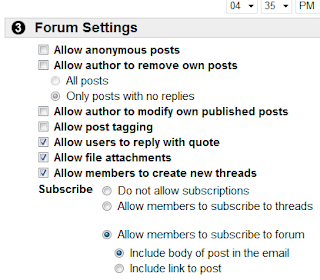
With all these extra classes, additional measures of organization have had to be made as well. I have this awesome master list on Microsoft OneNote that has put the organizational aspects of teaching on autopilot. (But that's another blog post entirely.)
One of my biggest weaknesses in online instruction is keeping up with the discussion boards. It's tough, because as much as I want my students to use them to participate in class, when I go into the boards a couple of times a week, I become overwhelmed with all the reading and find it difficult to actually particpate in the discussion.
I remember at the last Blackboard training I went to that there was an option for a subscriptions, so I started exploring how I could implement that tool. Here's what I found:
Go to the "Discussion Board"
Click on "Modify" next to the forum you wish to enable subscriptions to.
Under 3: Forum Settings, scroll down to the Subscribe menu.

Choose to allow subscriptions to threads or forums. If you choose to include forums, decide whether or not you'd like the subscription email to include the body of the post or just a link to the post.
Having subscribed to all my discussions, I'm looking forward to seeing how much more efficient I am with participating on the discussion boards.
Related links: Technology Teacher: Blackboard Discussion Board Features
Friday, August 28, 2009
Warning Label Generator Can Be Very Effective in Reaching Students
When I was a freshman in college, my composition teacher, Mary Daly, insisted that we never use the word very in our writing because
it was a dead adjective that didn't describe anything. I still find myself using the word in my writing, but because of Mary, whenever I do, I am prompted to think of a more descriptive adjective.
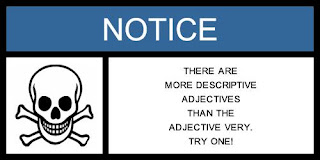
I used the Warning Label Generator, which I found the link to on the excellent social media site Mashable, to create this warning label for my students. What better way to caution them against using the adjective very then to attach it to a skull and crossbones. I'm creating additional graphics to post on various Blackboard pages. That should get their attention.
There are several easy steps to create a graphic like this.
Step 1: Choose a warning label such as Warning, Caution, Danger, Think, Be Careful, Safety First, Safety Notice, or just plain Notice.
Step 2: Choose one of over 40 symbols. There are some really fun ones. I can't wait to use Godzilla grabbing an airplane.
Step 3: Type in your warning.
Step 4: Click "Generate Warning Label."
Step 5: Right click on the graphic and hit "Save As" to save it onto your hard drive.
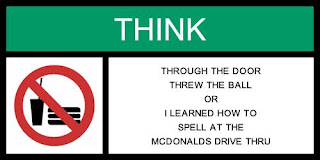
The next warning label I'm going to post will address one of my biggest pet peeves at a writing instructor:
Tuesday, July 14, 2009
Weeks 4, 5 and 6

Wow! Is it really week 6? It seems like just yesterday I was lamenting over week 3. So why haven't you hear from me since week 3? That's easy: I'm stinking busy!
The past three weeks have been a balancing act and in some respects, I seem to be on the losing end. I have 20 students between two sections for College 3 and it seems as if the workload is heavier than it was last time I had 20 students. The grading for this class is extremely time consuming and at times, tedious. Don't get me wrong, I love what I do for this class. It's just that when I'm in a time crunch, it's hard to enjoy the process.
Meanwhile, only about half of my English 1102 class is on board. This keeps grading at a minimum, but it almost seems harder to work with fewer students. I put so much mental energy into re-orienting myself to what's going on in the class, only to have a few assignments to grade.
There's been quite a learning curve here, even though I've been teaching online for five years at other colleges. The actual course I'm using was laid out differently than how I typically put classes together, which perhaps makes a difference in how students approach the class.
For example, typically I organize the class by week; whereas, this class is arranged by projects. It seems like a no-brainer to enter each project and complete the steps, and yet, it isn't happening. I think some of this may be because if a student gets behind, he or she gets lost. I thought I headed this off with an "Assignments" tab that lists all the assignments that need to be complete, but since I'm not seeing the results I'm expecting, I have to take into account that students might not be getting it.
Another thing I'm considering is that at College 1, online classes are a way of life and students tend to take them every term, so they have more experience. At College 3, I'm working with masters-level students, so they're just more academically mature.
At College 2, however, it seems like most of my students do not have experience with classes that are exclusively online. Couple this with the fact that most are transfer students trying to get the class "out of the way at the local community college," and that pretty much equals: Care about this class? Not so much!
I sent out an email last week expressing my concerns about the lack of work I was receiving and magically those blessed green boxes started to appear in the grade book, so it's becoming apparent who is serious about the class and who is wasting tuition money.
Summer school is tough.
Shortened classes are tough.
Online classes are tough.
Combine the three: crazy/tough.
We're all hanging in there together. There are a lot of things I'd do differently next time.
Related Links
Monday, June 29, 2009
Week 3 for English 1102 on Blackboard

Well, we're a third of the way through the class already. Summer is sure flying by. I'm used to teaching in 10- or 12-week chunks, but 8 is pretty crazy.
And yet, I'm feeling pretty lonely this week when it comes to my online class.
As I look at the curriculum, I wonder if there are just too many short assignments and if the workload from week to week fluctuates too much. When teaching online, consistency from week to week has been the key to success. If students know that every week will involve a reading, a discussion, and an assignment, there should be no problem. Right? This class takes on a different approach than anything I've ever taught online before.
As I elaborated on and tweeked the course shell I was given for the class, I naively reminded myself that anyone who registered for this class should understand that the six hours a week they're not spending inside the classroom should be applied to their own schedule online throughout the week.
I think the class is intuitively laid out. Students are brought through the course item by item, so you'd think they'd just move through the curriculum and not miss a beat. Yet there are so many outstanding assignments, it's hard not to be discouraged. Where are my students? Why aren't they online six hours a week?
How is a student supposed to function within an online class unless they're, well, online. Student's attend class through their participation, and so while the traditional large chunks of time that a shortened, face-to-face class demand (like Tuesday and Thursday morning from 8 AM 'til noon, and no, there is no bathroom break), an online class demands shorter chunks of time with greater frequency of attendance (say, 30 minutes a day, 5 days a week--and that's just being online to participate in discussions.)
I've had the entire week to think about this as I also wondered if students my are gauging the point value of this week's assignments with the value of the overall class. As an educator, it's annoying to think that students are cutting corners and not taking in the depth of my knowledge and preparation, which undoubtedly, if taken advantage of, will yield a group of excellent writers ready to tackle any research project, paper, or essay exam that comes their way.
But then I think of my own college days, when I'd look through the syllabus to see how many classes I could cut without being penalized and weigh that against the busy lifestyle of the 21st century college student, who likely works more hours than I did and may possible have kids and other distractions/obstacles or whatever you want to call them interfering with their ability to get everything done.
After all, as a mother of two little kids who is teaching five classes at three different colleges this summer and maintaining two blogs, how can I not relate?
And that's education in the 21st Centruy . . . and week 3 of my 1102 class.
Friday, June 19, 2009
Week 2 for English 1102 on Blackboard

Two weeks down, six weeks to go. This week marks the first week that students start researching for an actual writing project. They'll be choosing a statistic, and using that statistic to generate research.
Monday
Every week should begin with an announcement that gives students a peak at what will be expected of them not only this week, but next week. Students need the big picture to help them manage their time.
Because some students are still waiting for books to arrive and there are others who are registering late, I am allowing students another week to complete the week 1 assignments. I'm explained that this will not be the norm so that they understand that deadlines do matter.
My announcement includes a checklist of all the assignments they will work on this week. I've also created two, three-minute podcasts to further explain upcoming work. The first podcast explains Project 1, which will be worked on over a three-week period), and the second podcast presents a more in-depth look at the work they'll specifically complete this week.
Because this is a research-based course and students need to generate sources before they complete assignments, I constantly remind them to work ahead.
Later in the WeekI emailed students encouraging them to create some Google Alerts for their Project 1 assignment. I also sent emails to the two students who registered late. This is a slow week for me as I've put everything in place and am standing by for students to turn in their assignments. Since work is coming in at a slower rate than I'd like, I sent an email mid-week reminding students of deadlines and when discussion boards will close for good.
Jumping on Student Questions
One of my students emailed me because he was confused about an assignment. There was a document added to the Blackboard site, but the link was hard to see because it appeared at the top whereas the View/Complete assignment link was at the bottom. Thankfully, I was online and able to get back to him within 30 minutes (rare for a Friday evening.)
One of my students emailed me because he was confused about an assignment. There was a document added to the Blackboard site, but the link was hard to see because it appeared at the top whereas the View/Complete assignment link was at the bottom. Thankfully, I was online and able to get back to him within 30 minutes (rare for a Friday evening.)
I checked out the grade book to see if anyone else had turned in this assignment yet. (It was due that evening.) No one had, so I posted an announcement pointing students to the assignment location and sent a follow-up email with the attached document.
No matter how much we prepare for these online classes, there are always bumps in the road that we need to act on quickly so we don't lose or discourage our students.
XML


Thursday, June 18, 2009
Using Google Alerts to Enhance Research

In my English 1102 class, I suggest that my students use Google Alerts to help them with research. After setting up a Google Alert, users are sent an automatic email weekly, daily, or as new information is generated on the web for any search term they create an alert for. Results can be from Google News, Web, Blog, Video, and Group searches. Users may also do a "Comprehensive" search to include Google News, Web, and Blogs.
Here’s how it works:
- If you don’t already have a Google or Gmail account, you’ll need to set up a Google account. Go to http://www.google.com/.
- Click on ‘Sign In’ at the top right.
- Where it says “Don’t have a Google Account? Create an account now,” click to create an account.
- Once you’ve done this and signed in, go to “My Account” (top right)
- Then click on “Alerts” or if you don’t see that, click on “More” under “Try something new.
From here, you can set up an alert for your research topic. Think of as many ways to search your topic as you can and create an alert for each topic.
For example, I have weekly alerts for all subjects I’m interested in possibly writing about. Here are some of my alerts:
- Art and autism
- Autism awareness
- Elearning
- Online teaching
- Plagiarism
I’ve set each alert to send me a comprehensive email once a week to my email address. Each week, I get an email for each alert that gives a list of websites, news sites, blogs, etc. that are covering my topics. Sometimes I find some really useful articles/websites through this system.
Check out Google's FAQ page for more information.
Related Links
5 Great Web Resources to Enhance Learning
Week 1 for English 1102 on Blackboard
My Journey with Gmail

XML
Tuesday, June 16, 2009
5 Great Web Resources to Enhance Learning
Using the Internet to enhance the classroom experience is almost a must in 21st century learning. Here are five great ways engage students online and in the classroom.
Create a Class Wiki
Looking for a fresh way for students to work collaboratively? Why not create a class wiki. As a writing instructor, I love to bring my own interests into the classroom. One thing I love are movies. Recently I decided I needed a fresh way to write about film in a Freshman composition class. It all started with the use of a typical assignment I'd given over the years: to watch the film Rebel Without a Cause and write a character analysis. Students at College 2 found this assignment challenging as they they didn't have much experience writing an analytical, literary analysis. This came as kind of a surprise to me, as at College 1 dealt with this kind of assignment pretty regularly. As a way to better reach my students with this kind of assignment, I created a Class Wiki project.
After watching and thoroughly discussing Rebel Without a Cause, students were asked to choose their own film along the theme of teen drama--another love of mine. I then created a site on Wetpaint called Writer's Workshop.
The assignment: as a group, create a wiki page highlighting a teen drama. Students were asked to write a brief plot summary, three-five character analyses (depending on how many people were in the group), and a theme analysis. They were responsible for dividing the writing responsibilities, adding visual content (pictures, video clips, music, etc), and editing each other's work.
This assignment is unlike a typical group assignment in that every student is accountable in two ways: 1) they're required to turn in a one-page summary/analysis of their participation in the project, and 2) their work online is tracked on the wiki itself, so the content they add and edit is easily tracked.
After using this assignment for two semesters now, I have heard from many students that this was their favorite project for the course. More than half of my students stated that they were incredibly motivated to participate, enjoyed the process, and learned a lot about group dynamics.
Create a Class Wiki
Looking for a fresh way for students to work collaboratively? Why not create a class wiki. As a writing instructor, I love to bring my own interests into the classroom. One thing I love are movies. Recently I decided I needed a fresh way to write about film in a Freshman composition class. It all started with the use of a typical assignment I'd given over the years: to watch the film Rebel Without a Cause and write a character analysis. Students at College 2 found this assignment challenging as they they didn't have much experience writing an analytical, literary analysis. This came as kind of a surprise to me, as at College 1 dealt with this kind of assignment pretty regularly. As a way to better reach my students with this kind of assignment, I created a Class Wiki project.
After watching and thoroughly discussing Rebel Without a Cause, students were asked to choose their own film along the theme of teen drama--another love of mine. I then created a site on Wetpaint called Writer's Workshop.
The assignment: as a group, create a wiki page highlighting a teen drama. Students were asked to write a brief plot summary, three-five character analyses (depending on how many people were in the group), and a theme analysis. They were responsible for dividing the writing responsibilities, adding visual content (pictures, video clips, music, etc), and editing each other's work.
This assignment is unlike a typical group assignment in that every student is accountable in two ways: 1) they're required to turn in a one-page summary/analysis of their participation in the project, and 2) their work online is tracked on the wiki itself, so the content they add and edit is easily tracked.
After using this assignment for two semesters now, I have heard from many students that this was their favorite project for the course. More than half of my students stated that they were incredibly motivated to participate, enjoyed the process, and learned a lot about group dynamics.
Google Docs
After teaching writing for eight years, I still found it difficult to teach students about revision. Then College 3 introduced me to using Google Docs to teach revision. At College 2, I developed a revision assignment that students worked on weekly for four weeks. Each student created a Google account and uploaded their first paper onto Google Docs. They then shared their document with me so we both had access to it. Each week, I'd give students a new way to revise their papers: for punctuation, for word choice, for sentence structure, etc.
They also wrote a journal at the bottom of the document explaining what changes they either made or contemplated, or why they decided not to make any changes. This gave them an opportunity to reflect on their own writing process. After students made the assigned revisions for the week, I'd give them feedback and specific pointers. By making revision four separate assignments during four different classes, students got a feel for how to revise more extensively, reading their paper differently depending on what they were working on.
Google Alerts
If students are already logged in to a Google account, using Google Alerts is easy. With Google alerts they can create a search for a research topic, choose the types of websites they'd like results from, allocate how often they'd like to receive an alert (as they come, daily, weekly, etc), and assign an email address to which alerts will come.
For students doing research, this is a great way to generate ideas and possibly even sources. Links to news sites, websites, blogs, video sites, and groups related to specific searches are sent directly to email.
Podcasting
Making a verbal connection with online students is essential to their success. The more connected students are, the more likely they are to complete their assignments, interact on discussion boards, email the instructor with thoughts, suggestions, and questions, and succeed in an online course.
Podcasting is made easy through Audacity, which provides free, open source software that allows users to record and edit their own podcasts. Then either load podcasts onto Blackboard or find a free podcasting host site the podcast.
Blogs
When I teach writing a narrative, I like to teach by example. I do this by introducing students to my blog, The Adventures of Mr. Busypants, and providing commentary on my own writing process. This works well because students get to see me not just as a teacher, but as a writer. This especially helps build that personal connection that helps motivate students to care about what they're learning. I also invite students to give me feedback so that I may improve on my own writing.
How do you use the web-based resources to enhance the classroom experience?
Related Links
Week 2 for English 1102 on Blackboard
Teaching Online Blog is a Good Read for Online Instructors
Might as Well Face it I'm Addicted to Podcasting
Need a Documentary Now? Search from over 700 Documentaries Available Free at SnagFilms
Friday, June 12, 2009
Week 1 for English 1102 on Blackboard

Well, I've just completed Week 1 of my first online class at College 2 and I have to say, I'm pretty excited. First off, every student has now successfully logged in and started their assignments. Several are completely in sync with what's due, although I'm giving a little slack this week because the week 1 assignments are so tied to the book, which some are still waiting for from Amazon.com.
Some things I've done to ensure a successful start include:
Announcements
I posted an announcement, which I also emailed students over the weekend, inviting them to check out the course. I will also post weekly announcements reminding them about what's coming up.
Staff Information
I made the course inviting by posting my picture under staff information. It's the same one I use for my blog. Hopefully they'll see that I am human and that English doesn't have to be that scary or painful. Since I'm adjunct and I pretty much never check my voicemail, I included a cell phone number. We'll see how this goes. I tried this with College 3 and so far, the privilege has not been abused.
To mix things up, I added two teaching assistants to my staff list: my six-year-old son and his two-year-old sister. I added fun notes from each of them, which I hope fill add personality to the course. I want my students to see me not only as an expert in writing, but also as a person who cares about theirs. What better way to do this then to add some fun features that distinguish my online course from another?
My son Alex, aka Mr. Busypants "writes": My desk is situated right next to my mom's in our office. I work with her constantly and interrupt her whenever necessary. You can read about me at The Adventures of Mr. Busypants. I post my best artwork on Mondays. Click on the slideshow on the right to see examples of why I'm called Mr. Busypants.
As for my daughter, Jorie, aka Miss Chattyshoes, she "writes": If my mom isn't answering your emails, I am probably the reason. I demand attention all day long and if I even think I might not get it, I will throw myself on the floor and scream. You can read about me on The Adventures of Mr. Busypants every Tuesday in my supposed-to-be-weekly column Tuesdays with Jorie.
Discussion Boards
The primary work of week 1 was to participate on the discussion boards. The first board asked students to introduce themselves. I made sure I had a post as well and checked in several times a day to see who accessed the course. I also tried to respond to each student with some kind of connection, whether it be to the town they live in or a personal interest of theirs--I looked to make a connection.
The rest of the discussions assigned for that week had to do with completing exercises for the reading. Mid-week I noticed no one had yet tackled the first exercise, so I did the exercise myself and posted my thoughts and additional encouragement and pointers. As students started to post their assignments, I again looked for ways to acknowledge or encourage them. I didn't reply to every response, but I made an effort to respond once to each student.
Podcasts
Now I must admit, I'm addicted to podcasting. It's so fun! So far for the course, I've recorded three podcasts: the first went step-by-step through my Blackboard site; it was about twelve minutes long. The second went through the course introduction, which included an explanation of all the week 1 assignments, and was three minutes long. The latest podcast, also three minutes, discussed the first project, which will span over weeks 2, 3 and 4.
In my podcasts, I made sure I encouraged students to manage their time against their work, school and social schedule and to look ahead to the next project so that no assignment sneaks up on them. There are weeks where projects overlap (for example, I told them to look at project 1 this week so they could start thinking about a research topic), so I want to make sure they're aware of this. There will also be portions of the second project that may take time to execute (like scheduling an interview with an expert), so I don't want that part of the assignment to catch them by surprise.
Not only do I plan on posting a podcast for each project, but I also plan on posting weekly check-in podcasts to stay in touch. I have a tab called Podcasts on Blackboard and I also post each podcast on the Announcements page with a link, which is also emailed to each student.
Late Log Ons
By Thursday of week 1, I noticed that one student still had not logged on (you can check a student's last access through the grade book on Blackboard.) I emailed that student to find out what the problem was and encourage him to drop the course if he wasn't going to pursue it. I heard back from him within 24 hours. He was trying to access Blackboard through his old school account. Since the school recently switched over to a new system, his Blackboard account with his live classes came from a different log in. I am happy we resolved this issue so quickly and it was in part because of that personal connection.
Email Organization
One thing that I find to be difficult with working at several different colleges is email. It's time consuming to have to regularly check several accounts, several times a day.
To help with this, I created personal gmail accounts for each college, and forwarded those accounts to my primary email. In my primary email box, each email I receive is labeled with the address it is sent to, so it's really easy to see what emails come from which college.
For College 2, I went into my school email address and set up "rules" for forwarding certain email. For example, all email from important people in my department (like the dean, her assistants, key people from the library and other areas in the college) and with specific subjects (like English 1102), to my Gmail. That way, if something important pops up in that email account, I get it a little more quickly than I would otherwise.
Well, that's about it for Week 1. I'm looking forward to an excellent semester and will keep you posted on the ups and downs of English 1102 online.
Related Links
Teaching Online Blog is a Good Read for Online Instructors
Might As Well Face It I'm Addicted to Podcasting
Using Google Alerts to Enhance Research
My Journey with Gmail
5 Great Web Resources to Enhance Learning
Subscribe to:
Posts (Atom)


