I've been teaching for nearly 10 years and I've recently gotten the go-back-to-school bug. With two young kids and a full teaching schedule, pursuing another degree is not appealing. I really don't want a doctorate in this point in my career and I can't really think of a master's program that I want to enroll in (or pay for). But recently at College of DuPage, I got an email about an opportunity to take a graduate-level class through Aurora University for $325--INCLUDING the book.
I didn't think I could ever beat that price, and the subject was of interest--teaching studentes for the workplace. So a month ago, I attended my first class.
I love it. The discussion is stimulating and the instructor is open-minded. Everything we do in this class serves a greater purpose: to apply new ways of teaching to a specific class I'm teaching. How cool is that!
Right now I'm working on a resource website that I'm creating as an assignment called the Writing Resources Toolbox. In it I'm creating links to tools and resources for my students and for other instructors.
The student section has (or will have) both a Grammar Toolbox and a Writing Style Toolbox. The toolboxes will contain links to webpages and interactive exercises to help students brush up on grammar- and style-related issues in their writing.
The instructor section is the most exciting for me and includes Social Media Resources, Google Apps Resources, Additional Online Resources, and Web 2.0 Resources. I'm also hoping to create sections for Using Blackboard Effectively and Writing Assignments.
I'm most excited about this section. Basically, whenever I'm in my reader reviewing my favorite blogs (like Teach Online, Free Technology for Teachers, and Blogging about the Web 2.0 Connected Classroom), I add a link to anything useful out there that I've been successful implementing, would like to implement, or would simply like to learn more about.
What new technologies have you implemented in the classroom--online or F2F?
Friday, March 26, 2010


Thursday, March 18, 2010
Establishing Rapport with Online Students is Essential
Even though my schedule is crazed, I'm really excited about teaching this semester. I just started three new sections (two 8-week English composition courses online and one 8-week academic writing class online).
Establishing rapport with my students is my number one priority this week. It's difficult enough to take a writing class, but to do so online presents even more challenges. Many students do not feel confident about their writing, so to send it to some virtual grade book can be intimidating.
It is important to establish an online dialog with students the very first week. I do this in many ways using several venues. First of all, I start the class with a welcome email. If I can, I send it a week in advance to get students thinking about the course. Then when the course begins, I resend it to establish an official connection. I also recorded an introductory podcast, so students hear my voice and get to see me as a person. I build on this with a fun insightful instructor page, where I introduce myself and my "teaching assistants."
It is essential that during the first week of an online class, the instructor email the students 3-4 times to encourage their participation. By the first day of class, they've already heard from me twice: once inviting them for a sneak peak at the course and again the first day of the course.
The day of the first deadline (or night before), I send a reminder email to motivate students to get on Blackboard and complete their assignments. I also make grading a priority and virtually stalk the grade book so that I can review the first assignment and give feedback. While it's not essential to give feedback on all the exercises, it's important to establish a connection within those first assignments.
In my Comp 1 classes, for example, students are asked to discuss several areas of their writing. When I review their responses, I look for something to grasp onto, whether it's a way to compliment them or a way to alleviate their fears or stress. The next thing I do is review their class homepage, which is one of their first assignments for the term. Again, I search for a connection and make comments as I find them. The goal is for every student to receive feedback from me during that first week.
Another thing I do is start a discussion board right away. This semester, I am taking a graduate-level class about preparing students to write in the workplace. One of my assignments was to write an advance organizer, which consists of ten T/F questions related to the course content, ten Interesting/Boring questions as a means to touch base with each students personal interest levels, and ten Agree/Disagree questions to tap into their expectations for the course. I posted an "extra credit" (yes, I lured them with the academic equivalent to candy) discussion board to talk about the survey. Then I cyber-stalked the discussion boards looking for reasons to respond and encourage participants.
I am now at the end of my first week of eight and my final email of the week is to those who have not yet logged in to Blackboard, gently reminding them of the importance of timely participation.
I think I've don just about all I've can to engage students this week and am looking forward to seeing how my efforts pay off throughout the semester.
I'll let you know how it goes.
Establishing rapport with my students is my number one priority this week. It's difficult enough to take a writing class, but to do so online presents even more challenges. Many students do not feel confident about their writing, so to send it to some virtual grade book can be intimidating.
It is important to establish an online dialog with students the very first week. I do this in many ways using several venues. First of all, I start the class with a welcome email. If I can, I send it a week in advance to get students thinking about the course. Then when the course begins, I resend it to establish an official connection. I also recorded an introductory podcast, so students hear my voice and get to see me as a person. I build on this with a fun insightful instructor page, where I introduce myself and my "teaching assistants."
It is essential that during the first week of an online class, the instructor email the students 3-4 times to encourage their participation. By the first day of class, they've already heard from me twice: once inviting them for a sneak peak at the course and again the first day of the course.
The day of the first deadline (or night before), I send a reminder email to motivate students to get on Blackboard and complete their assignments. I also make grading a priority and virtually stalk the grade book so that I can review the first assignment and give feedback. While it's not essential to give feedback on all the exercises, it's important to establish a connection within those first assignments.
In my Comp 1 classes, for example, students are asked to discuss several areas of their writing. When I review their responses, I look for something to grasp onto, whether it's a way to compliment them or a way to alleviate their fears or stress. The next thing I do is review their class homepage, which is one of their first assignments for the term. Again, I search for a connection and make comments as I find them. The goal is for every student to receive feedback from me during that first week.
Another thing I do is start a discussion board right away. This semester, I am taking a graduate-level class about preparing students to write in the workplace. One of my assignments was to write an advance organizer, which consists of ten T/F questions related to the course content, ten Interesting/Boring questions as a means to touch base with each students personal interest levels, and ten Agree/Disagree questions to tap into their expectations for the course. I posted an "extra credit" (yes, I lured them with the academic equivalent to candy) discussion board to talk about the survey. Then I cyber-stalked the discussion boards looking for reasons to respond and encourage participants.
I am now at the end of my first week of eight and my final email of the week is to those who have not yet logged in to Blackboard, gently reminding them of the importance of timely participation.
I think I've don just about all I've can to engage students this week and am looking forward to seeing how my efforts pay off throughout the semester.
I'll let you know how it goes.
Wednesday, March 17, 2010
Saturday, January 30, 2010
Using the Subscribe Feature on Blackboard
This school year I have found myself teaching more classes than ever. With the economy being as it is, it's hard to pass up work--especially when my husband may not have a job for much longer.
With all these extra classes, additional measures of organization have had to be made as well. I have this awesome master list on Microsoft OneNote that has put the organizational aspects of teaching on autopilot. (But that's another blog post entirely.)
One of my biggest weaknesses in online instruction is keeping up with the discussion boards. It's tough, because as much as I want my students to use them to participate in class, when I go into the boards a couple of times a week, I become overwhelmed with all the reading and find it difficult to actually particpate in the discussion.
I remember at the last Blackboard training I went to that there was an option for a subscriptions, so I started exploring how I could implement that tool. Here's what I found:
Go to the "Discussion Board"
Click on "Modify" next to the forum you wish to enable subscriptions to.
Under 3: Forum Settings, scroll down to the Subscribe menu.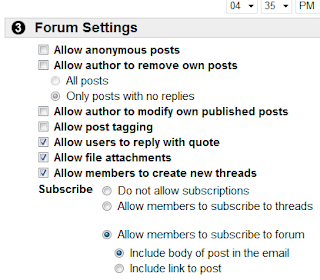
With all these extra classes, additional measures of organization have had to be made as well. I have this awesome master list on Microsoft OneNote that has put the organizational aspects of teaching on autopilot. (But that's another blog post entirely.)
One of my biggest weaknesses in online instruction is keeping up with the discussion boards. It's tough, because as much as I want my students to use them to participate in class, when I go into the boards a couple of times a week, I become overwhelmed with all the reading and find it difficult to actually particpate in the discussion.
I remember at the last Blackboard training I went to that there was an option for a subscriptions, so I started exploring how I could implement that tool. Here's what I found:
Go to the "Discussion Board"
Click on "Modify" next to the forum you wish to enable subscriptions to.
Under 3: Forum Settings, scroll down to the Subscribe menu.

Choose to allow subscriptions to threads or forums. If you choose to include forums, decide whether or not you'd like the subscription email to include the body of the post or just a link to the post.
Having subscribed to all my discussions, I'm looking forward to seeing how much more efficient I am with participating on the discussion boards.
Related links: Technology Teacher: Blackboard Discussion Board Features
Saturday, January 9, 2010
25 Tools: A Toolbox for Learning Professinals 2009
I came across this great resource on Slideshare posted by Jane Hart, a social learning consultant and founder of The Centre for Learning and Performance Technologies.
Friday, August 28, 2009
Warning Label Generator Can Be Very Effective in Reaching Students
When I was a freshman in college, my composition teacher, Mary Daly, insisted that we never use the word very in our writing because
it was a dead adjective that didn't describe anything. I still find myself using the word in my writing, but because of Mary, whenever I do, I am prompted to think of a more descriptive adjective.
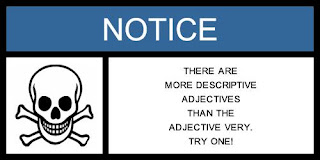
I used the Warning Label Generator, which I found the link to on the excellent social media site Mashable, to create this warning label for my students. What better way to caution them against using the adjective very then to attach it to a skull and crossbones. I'm creating additional graphics to post on various Blackboard pages. That should get their attention.
There are several easy steps to create a graphic like this.
Step 1: Choose a warning label such as Warning, Caution, Danger, Think, Be Careful, Safety First, Safety Notice, or just plain Notice.
Step 2: Choose one of over 40 symbols. There are some really fun ones. I can't wait to use Godzilla grabbing an airplane.
Step 3: Type in your warning.
Step 4: Click "Generate Warning Label."
Step 5: Right click on the graphic and hit "Save As" to save it onto your hard drive.
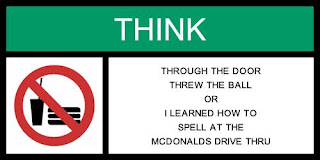
The next warning label I'm going to post will address one of my biggest pet peeves at a writing instructor:
Tuesday, August 25, 2009
Top 5 Grammar Girl Podcasts that Every Freshman in College Should Listen To
I love Grammar Girl's Quick and Dirty Tips for better writing. Her podcasts are awesome: so helpful and informative. As school starts this fall, I decided that a blog post with five great links podcasts and transcripts that cover some of the most common errors I see in student work would be in order.
- Comma Splice. If you ask a group of student what a fragment or a run-on sentence is, there's a good chance they can describe one to you, but ask 'em about a comma splice, and there's a universal blank that sweeps across their faces. So what's a comma splice? It's basically a run-on sentence with a comma seperating the two main clauses that run together. I guess they're hard to identify because there are so many reasons to use a comma, so there's not an obvious test to check for them during the editing process.
- Which versus That. Another area of contentions in student writing is the use of that verses which. I have found that most students use that correctly when they use it, but that it is not uncommon to mistake which for what should be that. Grammar Girl does a wonderful job explaining the difference by defining the restrictive that modifier, which is needed for the sentence to make sense, and the nonrestrictive which modifier, which can be left out and have the sentence still make sense. Another issue in the that/which debacle is punctuation. Just remember punctuation isn't necessary with restrictive modifiers (that), but is necessary with nonrestrictive modifiers (which), which can be left out of the sentence.
- Active Voice versus Passive Voice. Okay, so this isn't a common-error issue; however, I would be remiss if I ignored students' tendency to be overly wordy by using passive voice in their writing. To create clear and direct sentences, instructors typically prefer active voice in academic writing.
- How to Use Parallel Construction Correctly. Understanding parallel structure comes in handy in writing. It helps clarify your statements and has a pleasing rhetorical effect on the reader.
- Top Ten Grammar Myths. This podcasts debunks common myths about the use of language. Do you think that a run-on sentence is a really long sentence? Have you ever been told not to start a sentence with the word however? Do you use the word irregardless? These and many other questions will be answered in this podcast.
Subscribe to:
Posts (Atom)