Prep for an online class doesn't end once the course is initially complete and delivered that first time. As in the traditional classroom, there's always room for improvement. Every act of preparation requires time and effort. It's not like in the f2f classroom, where you can come up with an idea on the fly and give it a try to see if it works. Every act must be intentional and the steps for each act must be carefully planned and prepared.
Every semester I choose one thing to improve, even if there are a gazillion things that need help. Because of the time commitment, I find that any improvement I make needs to be ready before the class starts because once that happens, all my time goes into my students.
This this current semester, for example, I took something I learned delivering the curriculum from the masters-level academic writing course I teach, and incorporated into my undergrad composition class.
In the graduate-level class, students journal about what they read and start to connect the theories of the readings into practice in their writing. One thing I noticed about the online freshman composition class I teach, is that there is no grammar component in the class. My masters-level students have often lamented in their journals that the grammar and style concepts they were learning should have been taught to them in undergrad. Knowing this, I decided to transfer this concept to my freshman, hoping that they'd see a benefit in journaling about what they read. While there are still many changes I'd like to make to the course, this was the change I thought would be most beneficial to my students, so I went with it. If it's successful, I'll leave it in the curriculum, and if it's not, I'll either modify it or discontinue this exercise.
Another improvement I'd like to make in my online classes is to add weekly podcasts to the announcements. Preparing podcasts can be extremely time consuming. Personally, I can't just sit down and record--I need to write a script first. I record using Audacity, which allows me to edit out any bumbles I make. So far, the majority of my podcasts have been introductory to give students another way to get to know me as an instructor. One summer semester, I recorded a podcast for each week. I'm not sure how effective they were, or how necessary, but for some students, hearing instructions in addition to reading them can be beneficial.
Composition classes are scary for many students, so I like to convey an open and relaxed atmosphere to empower students to write instead of worrying how I'm going to react to their writing. I would like to create more effective assignments and podcasts in the future to further enhance my current curriculum.
Thursday, April 8, 2010


Monday, April 5, 2010
What is Online Learning and How Much Easier is it Than Face to Face?
A key ingredient for online learning is MOTIVATION. Because students don’t have to be at a specific place at a specific time, it’s easy for them to forget the online class exists. I recently read a blog post on Teaching Online where the virtual professor talked about adult learning environments being “learner-centered education that guides learners to be self-directed and independent in their learning.” The desired end result in such an environment is that students and teachers become equal partners in the learning process. This to me is a perfect description of online learning
Sometimes students don't realize how reading- and writing intensive online classes are. Students need to self-evaluate to determine if this format will work for them.
One way to change the perception that online=easy is for instructors to be clear and up front about the time commitment necessary and how the way one operates in an online setting is totally different than the traditional classroom.
When instructors are clear about their expectations, serious students will be motivated to think about their schedule and how they will fit the level of interaction necessary to succeed into what is likely a pretty busy lifestyle.
I, for one, am often at the mercy of my kids and my students (and my husband, and the laundry/dishes/house, and the kids a little more). It's kind of scary to be committed to teaching and taking an online class because there will be days (like today) where I can cyber stalk the discussion boards, but there may be others where I'm so busy that I miss that 48 hour window.
Do how do students/teachers get organized?
One of the first things I tell my online students is to get a calendar and write down due dates for all assignments for not only my course and their other courses, but also their other commitments in life. There's a healthy population of young adults out there who don't know how to manage a calendar.
Weekly announcements help as well. I try to be friendly and conversational in them as I remind them of the week's due dates and to look ahead to next week.
This will not guarantee a student will be successful in an online course; however, being clear about expectations and helping students get organized are two important factors in achieving success in an online class.
Sometimes students don't realize how reading- and writing intensive online classes are. Students need to self-evaluate to determine if this format will work for them.
One way to change the perception that online=easy is for instructors to be clear and up front about the time commitment necessary and how the way one operates in an online setting is totally different than the traditional classroom.
When instructors are clear about their expectations, serious students will be motivated to think about their schedule and how they will fit the level of interaction necessary to succeed into what is likely a pretty busy lifestyle.
I, for one, am often at the mercy of my kids and my students (and my husband, and the laundry/dishes/house, and the kids a little more). It's kind of scary to be committed to teaching and taking an online class because there will be days (like today) where I can cyber stalk the discussion boards, but there may be others where I'm so busy that I miss that 48 hour window.
Do how do students/teachers get organized?
One of the first things I tell my online students is to get a calendar and write down due dates for all assignments for not only my course and their other courses, but also their other commitments in life. There's a healthy population of young adults out there who don't know how to manage a calendar.
Weekly announcements help as well. I try to be friendly and conversational in them as I remind them of the week's due dates and to look ahead to next week.
This will not guarantee a student will be successful in an online course; however, being clear about expectations and helping students get organized are two important factors in achieving success in an online class.
Sunday, April 4, 2010
Continuing My Own Education, Part 2
Having gotten my first F2F class on the other side of the podium under my belt, I decided to pursue something more. It started with a conversation with the woman who teaches before me in the computer lab on Thursday nights. JJ and I have about 40 minutes each week to shoot the breeze about English 1101 and other teaching topics between class meetings.
JJ told me about the Illinois Online Network, where I can pursue a Master Online Teacher Certificate where else but online. What is particularly cool about this program is because I'm a part of the College of DuPage faculty (a COD faculty member helped design this program), tuition is only $60 per class.
In this program, I will take four core classes that are fully online and 8-weeks long. There's also one elective and a practicum that needs to be completed. I started my first class, "Online Learning: An Overview," earlier this week and I'm loving it.
I've been online grading a lot this week and have more time to devote than usual, so I've been quite the over-achiever on the message boards. I hope my classmates don't think I'm a total suck-up. I'm simply deprived of conversation with other adults in my field. I've been deprived for a very long time, so I'm really enjoying connecting with my peers in the field.
I certainly don't have the time for these classes, but I'm so incredibly motivated right now that I'm MAKING the time. It's such a creative outlet for me and it's inspiring me to make time to reach my own personal writing and teaching goals instead of always focusing on the needs and goals of others. It's a nice change.
Related links: Continuing My Own Education, Part 1
JJ told me about the Illinois Online Network, where I can pursue a Master Online Teacher Certificate where else but online. What is particularly cool about this program is because I'm a part of the College of DuPage faculty (a COD faculty member helped design this program), tuition is only $60 per class.
In this program, I will take four core classes that are fully online and 8-weeks long. There's also one elective and a practicum that needs to be completed. I started my first class, "Online Learning: An Overview," earlier this week and I'm loving it.
I've been online grading a lot this week and have more time to devote than usual, so I've been quite the over-achiever on the message boards. I hope my classmates don't think I'm a total suck-up. I'm simply deprived of conversation with other adults in my field. I've been deprived for a very long time, so I'm really enjoying connecting with my peers in the field.
I certainly don't have the time for these classes, but I'm so incredibly motivated right now that I'm MAKING the time. It's such a creative outlet for me and it's inspiring me to make time to reach my own personal writing and teaching goals instead of always focusing on the needs and goals of others. It's a nice change.
Related links: Continuing My Own Education, Part 1
Friday, March 26, 2010
Continuing My Own Education
I've been teaching for nearly 10 years and I've recently gotten the go-back-to-school bug. With two young kids and a full teaching schedule, pursuing another degree is not appealing. I really don't want a doctorate in this point in my career and I can't really think of a master's program that I want to enroll in (or pay for). But recently at College of DuPage, I got an email about an opportunity to take a graduate-level class through Aurora University for $325--INCLUDING the book.
I didn't think I could ever beat that price, and the subject was of interest--teaching studentes for the workplace. So a month ago, I attended my first class.
I love it. The discussion is stimulating and the instructor is open-minded. Everything we do in this class serves a greater purpose: to apply new ways of teaching to a specific class I'm teaching. How cool is that!
Right now I'm working on a resource website that I'm creating as an assignment called the Writing Resources Toolbox. In it I'm creating links to tools and resources for my students and for other instructors.
The student section has (or will have) both a Grammar Toolbox and a Writing Style Toolbox. The toolboxes will contain links to webpages and interactive exercises to help students brush up on grammar- and style-related issues in their writing.
The instructor section is the most exciting for me and includes Social Media Resources, Google Apps Resources, Additional Online Resources, and Web 2.0 Resources. I'm also hoping to create sections for Using Blackboard Effectively and Writing Assignments.
I'm most excited about this section. Basically, whenever I'm in my reader reviewing my favorite blogs (like Teach Online, Free Technology for Teachers, and Blogging about the Web 2.0 Connected Classroom), I add a link to anything useful out there that I've been successful implementing, would like to implement, or would simply like to learn more about.
What new technologies have you implemented in the classroom--online or F2F?
I didn't think I could ever beat that price, and the subject was of interest--teaching studentes for the workplace. So a month ago, I attended my first class.
I love it. The discussion is stimulating and the instructor is open-minded. Everything we do in this class serves a greater purpose: to apply new ways of teaching to a specific class I'm teaching. How cool is that!
Right now I'm working on a resource website that I'm creating as an assignment called the Writing Resources Toolbox. In it I'm creating links to tools and resources for my students and for other instructors.
The student section has (or will have) both a Grammar Toolbox and a Writing Style Toolbox. The toolboxes will contain links to webpages and interactive exercises to help students brush up on grammar- and style-related issues in their writing.
The instructor section is the most exciting for me and includes Social Media Resources, Google Apps Resources, Additional Online Resources, and Web 2.0 Resources. I'm also hoping to create sections for Using Blackboard Effectively and Writing Assignments.
I'm most excited about this section. Basically, whenever I'm in my reader reviewing my favorite blogs (like Teach Online, Free Technology for Teachers, and Blogging about the Web 2.0 Connected Classroom), I add a link to anything useful out there that I've been successful implementing, would like to implement, or would simply like to learn more about.
What new technologies have you implemented in the classroom--online or F2F?
Thursday, March 18, 2010
Establishing Rapport with Online Students is Essential
Even though my schedule is crazed, I'm really excited about teaching this semester. I just started three new sections (two 8-week English composition courses online and one 8-week academic writing class online).
Establishing rapport with my students is my number one priority this week. It's difficult enough to take a writing class, but to do so online presents even more challenges. Many students do not feel confident about their writing, so to send it to some virtual grade book can be intimidating.
It is important to establish an online dialog with students the very first week. I do this in many ways using several venues. First of all, I start the class with a welcome email. If I can, I send it a week in advance to get students thinking about the course. Then when the course begins, I resend it to establish an official connection. I also recorded an introductory podcast, so students hear my voice and get to see me as a person. I build on this with a fun insightful instructor page, where I introduce myself and my "teaching assistants."
It is essential that during the first week of an online class, the instructor email the students 3-4 times to encourage their participation. By the first day of class, they've already heard from me twice: once inviting them for a sneak peak at the course and again the first day of the course.
The day of the first deadline (or night before), I send a reminder email to motivate students to get on Blackboard and complete their assignments. I also make grading a priority and virtually stalk the grade book so that I can review the first assignment and give feedback. While it's not essential to give feedback on all the exercises, it's important to establish a connection within those first assignments.
In my Comp 1 classes, for example, students are asked to discuss several areas of their writing. When I review their responses, I look for something to grasp onto, whether it's a way to compliment them or a way to alleviate their fears or stress. The next thing I do is review their class homepage, which is one of their first assignments for the term. Again, I search for a connection and make comments as I find them. The goal is for every student to receive feedback from me during that first week.
Another thing I do is start a discussion board right away. This semester, I am taking a graduate-level class about preparing students to write in the workplace. One of my assignments was to write an advance organizer, which consists of ten T/F questions related to the course content, ten Interesting/Boring questions as a means to touch base with each students personal interest levels, and ten Agree/Disagree questions to tap into their expectations for the course. I posted an "extra credit" (yes, I lured them with the academic equivalent to candy) discussion board to talk about the survey. Then I cyber-stalked the discussion boards looking for reasons to respond and encourage participants.
I am now at the end of my first week of eight and my final email of the week is to those who have not yet logged in to Blackboard, gently reminding them of the importance of timely participation.
I think I've don just about all I've can to engage students this week and am looking forward to seeing how my efforts pay off throughout the semester.
I'll let you know how it goes.
Establishing rapport with my students is my number one priority this week. It's difficult enough to take a writing class, but to do so online presents even more challenges. Many students do not feel confident about their writing, so to send it to some virtual grade book can be intimidating.
It is important to establish an online dialog with students the very first week. I do this in many ways using several venues. First of all, I start the class with a welcome email. If I can, I send it a week in advance to get students thinking about the course. Then when the course begins, I resend it to establish an official connection. I also recorded an introductory podcast, so students hear my voice and get to see me as a person. I build on this with a fun insightful instructor page, where I introduce myself and my "teaching assistants."
It is essential that during the first week of an online class, the instructor email the students 3-4 times to encourage their participation. By the first day of class, they've already heard from me twice: once inviting them for a sneak peak at the course and again the first day of the course.
The day of the first deadline (or night before), I send a reminder email to motivate students to get on Blackboard and complete their assignments. I also make grading a priority and virtually stalk the grade book so that I can review the first assignment and give feedback. While it's not essential to give feedback on all the exercises, it's important to establish a connection within those first assignments.
In my Comp 1 classes, for example, students are asked to discuss several areas of their writing. When I review their responses, I look for something to grasp onto, whether it's a way to compliment them or a way to alleviate their fears or stress. The next thing I do is review their class homepage, which is one of their first assignments for the term. Again, I search for a connection and make comments as I find them. The goal is for every student to receive feedback from me during that first week.
Another thing I do is start a discussion board right away. This semester, I am taking a graduate-level class about preparing students to write in the workplace. One of my assignments was to write an advance organizer, which consists of ten T/F questions related to the course content, ten Interesting/Boring questions as a means to touch base with each students personal interest levels, and ten Agree/Disagree questions to tap into their expectations for the course. I posted an "extra credit" (yes, I lured them with the academic equivalent to candy) discussion board to talk about the survey. Then I cyber-stalked the discussion boards looking for reasons to respond and encourage participants.
I am now at the end of my first week of eight and my final email of the week is to those who have not yet logged in to Blackboard, gently reminding them of the importance of timely participation.
I think I've don just about all I've can to engage students this week and am looking forward to seeing how my efforts pay off throughout the semester.
I'll let you know how it goes.
Wednesday, March 17, 2010
Saturday, January 30, 2010
Using the Subscribe Feature on Blackboard
This school year I have found myself teaching more classes than ever. With the economy being as it is, it's hard to pass up work--especially when my husband may not have a job for much longer.
With all these extra classes, additional measures of organization have had to be made as well. I have this awesome master list on Microsoft OneNote that has put the organizational aspects of teaching on autopilot. (But that's another blog post entirely.)
One of my biggest weaknesses in online instruction is keeping up with the discussion boards. It's tough, because as much as I want my students to use them to participate in class, when I go into the boards a couple of times a week, I become overwhelmed with all the reading and find it difficult to actually particpate in the discussion.
I remember at the last Blackboard training I went to that there was an option for a subscriptions, so I started exploring how I could implement that tool. Here's what I found:
Go to the "Discussion Board"
Click on "Modify" next to the forum you wish to enable subscriptions to.
Under 3: Forum Settings, scroll down to the Subscribe menu.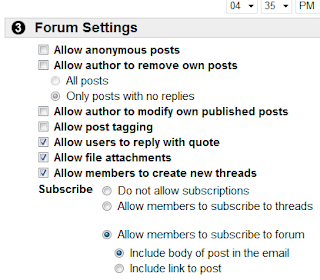
With all these extra classes, additional measures of organization have had to be made as well. I have this awesome master list on Microsoft OneNote that has put the organizational aspects of teaching on autopilot. (But that's another blog post entirely.)
One of my biggest weaknesses in online instruction is keeping up with the discussion boards. It's tough, because as much as I want my students to use them to participate in class, when I go into the boards a couple of times a week, I become overwhelmed with all the reading and find it difficult to actually particpate in the discussion.
I remember at the last Blackboard training I went to that there was an option for a subscriptions, so I started exploring how I could implement that tool. Here's what I found:
Go to the "Discussion Board"
Click on "Modify" next to the forum you wish to enable subscriptions to.
Under 3: Forum Settings, scroll down to the Subscribe menu.

Choose to allow subscriptions to threads or forums. If you choose to include forums, decide whether or not you'd like the subscription email to include the body of the post or just a link to the post.
Having subscribed to all my discussions, I'm looking forward to seeing how much more efficient I am with participating on the discussion boards.
Related links: Technology Teacher: Blackboard Discussion Board Features
Subscribe to:
Posts (Atom)